
Overview
The HUAWEI WiFi AX3 (Dual-Core) is a powerful router that brings the latest Wi-Fi 6 technology to your home network.
Features:
- Wi-Fi 6 Plus (802.11ax): Wi-Fi 6 is the new standard that offers significant improvements over Wi-Fi 5. With 1024-QAM and 160 MHz bandwidth, the overall speed of Wi-Fi 6 is greatly boosted. Here's a comparison:
- Wi-Fi 5 single stream: 433 Mbps
- Wi-Fi 6 single stream: 1.2 Gbps
- Theoretical speed: Up to 3,000 Mbps (574 Mbps on 2.4 GHz and 2,402 Mbps on 5 GHz).
- Larger Capacity: Wi-Fi 6 (with OFDMA) allows the router to connect more devices simultaneously with little slowdown. While Wi-Fi 5 supports 32 devices at 5 GHz, Wi-Fi 6 can handle up to 128 devices.
- Lowered Latency: Wi-Fi 6 reduces latency, providing faster response times when connecting to multiple devices. Enjoy smoother interactions, especially in gaming and video streaming.
- Reduced Power Consumption: The router negotiates wake-up times among connected devices, minimizing power consumption while waiting.
- HUAWEI Wi-Fi 6 Plus: When paired with HUAWEI Wi-Fi 6-enabled devices, the AX3 router delivers optimal speed and efficiency. It supports 160 MHz frequency bandwidth, ensuring blazing-fast speeds.
- Signal Penetration: HUAWEI Wi-Fi 6-enabled phones can send stronger signals back to the AX3 router, even through walls and floors. Good reception, even from distant locations.
- Multiple Connections: Unlike traditional routers, AX3 efficiently connects a multitude of devices. Supporting OFDMA multi-user technology, it can send data to multiple devices simultaneously.
- Gigahome Dual-Core CPU: The AX3 router boasts a powerful Gigahome Dual-Core 1.2 GHz CPU, ensuring smooth performance.
- Speed Boost for Wi-Fi 5 Devices: When connecting AX3 to devices supporting 160 MHz (like top-of-the-line HUAWEI Wi-Fi 5-enabled smartphones, tablets, and laptops), internet speed increases by 60% and more.
- Visualized Wi-Fi Diagnosis and Parental Controls: Easily manage your network with visual diagnostics and parental control features.
Specifications:
Dimension: 225mm x 159.2mm x 39.7mm, About 403g
Wi-Fi: 802.11ax/ac/n/a 2 x 2 & 802.11ax/n/b/g 2 x 2, MU-MIMO
Wireless speed is up to 2976 Mbps (2.4 GHz: 574 Mbps; 5 GHz: 2402 Mbps)
Processors: Gigahome Quad-core 1.4 GHz CPU
Interface: WAN: One 10/100/1000 Mbps Ethernet port
LAN: Three 10/100/1000 Mbps Ethernet ports
Software Functions: APP: HUAWEI AI Life App
Huawei Share (Tap to Connect), Huawei HiLink & 802.11v protocol, IPv4/IPv6, PPPoE/DHCP/static IP address/Bridge WAN connection methods, Wi-Fi timer, Guest Wi-Fi, Device speed limiting, MAC address filter, Parental control, VPN pass through, DMZ/virtual server.
Security: TrustZone Security, Anti-brute force algorithms, WPA3, Firewall, DMZ, PAP/CHAP, DMZ/DoS attack protection.
*The preceding specifications are theoretical values based on product design. Some features and specifications may vary across markets.
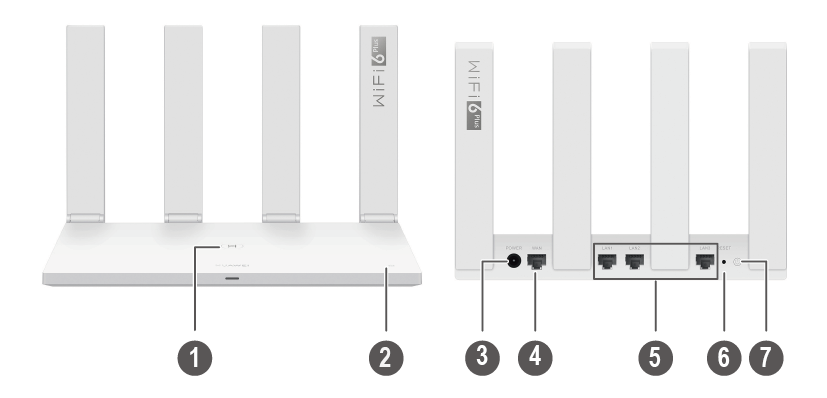
| No. | Button/Port | Description |
|---|---|---|
| 1 | H button |
The indicator will flash when the router discovers a device that supports HarmonyOS Connect. You can press the H button to connect the device to the router's WiFi. By pressing the H button, you can also enable WPS to connect a WPS device to the router. |
| 2 | NFC label |
Tap an Android device with NFC enabled against the NFC label to quickly connect to the WiFi network. |
| 3 | Power port | Connect the power adapter to this port. |
| 4 | WAN port | The port that connects to the Internet. |
| 5 | LAN ports | The ports that connect to network devices such as a computer. |
| 6 | RESET hole | Press and hold the RESET hole for more than two seconds. |
| 7 | Power button | Press once to power on, or hold for three seconds to power off. |